Skills / Workflow
Skills Registry
Turns long-lived reusable skills into a browsable public registry: narrow down by task and scenario first, then jump to GitHub for the full spec, updates, and source.
- Role
- Owner / Product Engineer: turned scattered reusable skills into a public-facing capability entry point with clear content boundaries.
- Time
- Ongoing · 2026-05-20
- Platforms
- Web
A public skill registry that starts from the task, not the command name
01 / Background
Why this exists
Once reusable skills pile up, the bottleneck shifts from capability creation to capability discovery. This project makes hidden workflow knowledge visible and usable before a person even knows the exact skill name.

The current public Skills Registry surface.
02 / Scenario
Use scenarios
- Start from a task like research, writing, frontend work, or shipping when you do not yet know which skill to open first.
- Share reusable workflows publicly without forcing people to parse raw SKILL.md files or repo structure immediately.
- Separate public, sanitized-public, and still-private capabilities at the presentation layer.
The project’s current priorities and delivered decisions.

Interface screenshot 01.
03 / Delivery
What I shipped
- A task-first homepage that asks what you want to get done before exposing the skill list.
- Scene pages plus skill overview blocks for quicker triage and comparison.
- Direct GitHub handoff for full instructions, source, and recent updates.
The core path from input to outcome.

Interface screenshot 02.
04 / Design
Design decisions
- The information architecture evolved from a more directory-like "skills hub" into a task-first registry because most people know the job before they know the invoke phrase.
- The warm-paper surface, serif typography, and rule-based layout intentionally make it feel like a guide or registry rather than a noisy SaaS dashboard.
- Deep documentation stays in GitHub so the public site remains a selection layer instead of becoming an overloaded docs mirror.
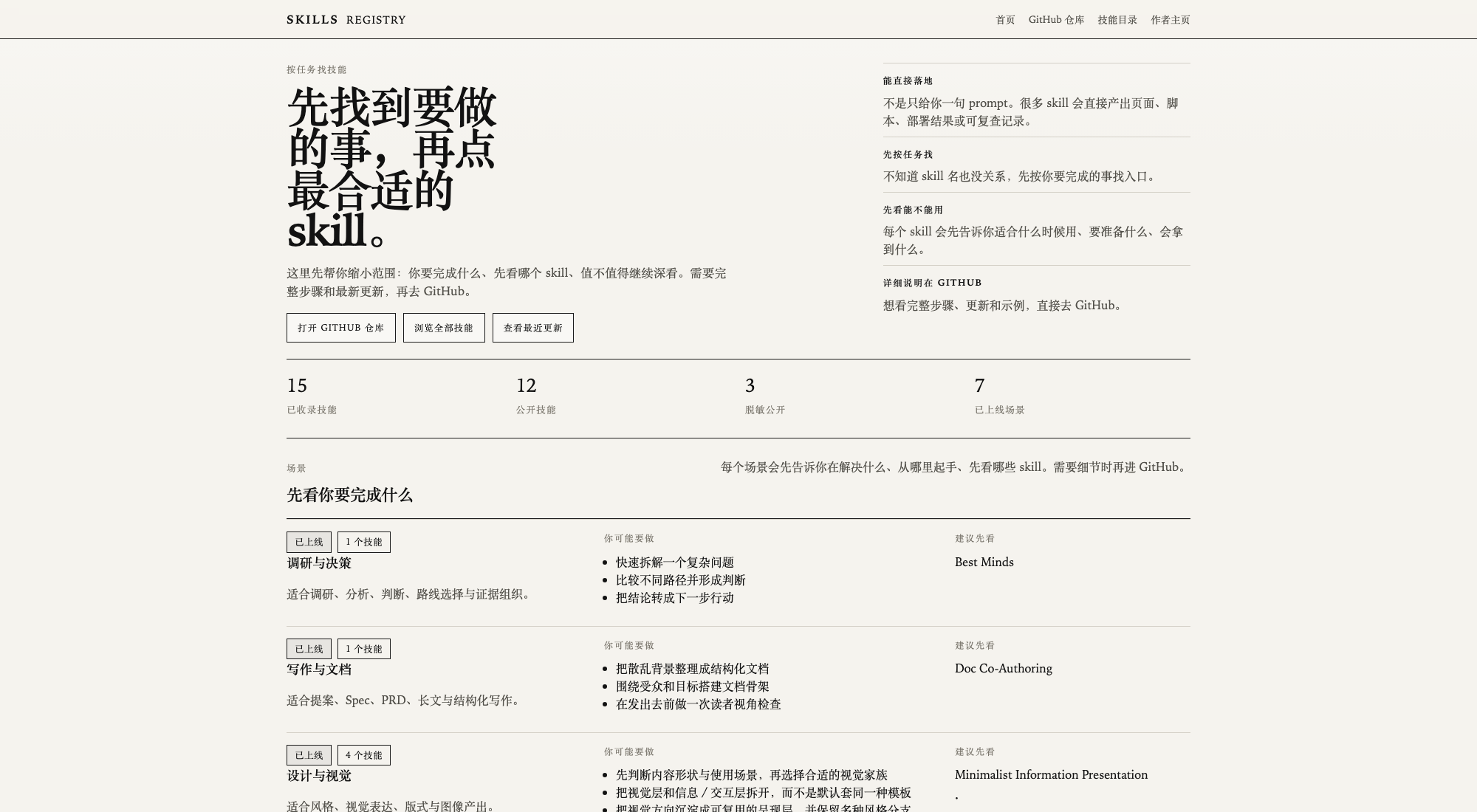
Interface screenshot 04.
05 / Tech
Implementation
- Published as a lightweight static website focused on content structure, navigation, and link governance.
- The public site and GitHub repo play different roles: discovery and curation on one side, full specs and change history on the other.
- The surface also communicates publishing state through counts such as public skills, sanitized-public skills, and live scenarios.
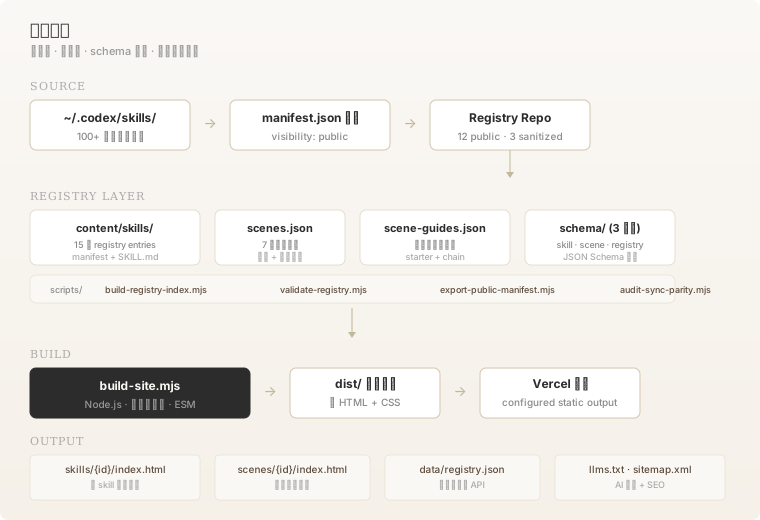
Product flow diagram.
06 / Access
Current access
- Live site: https://skills.zondev.top.
- The page itself links out to the GitHub repository, full skill directory, and recent updates.
Experience in depth
Pain points, user stories, and interaction design
Not a tech stack section. This is about the situation people are in, where they get stuck, and what I did about it.
My pain points
Every project here starts from somewhere I personally got stuck.
- P01
Over a year I accumulated 100+ reusable AI workflows, all buried in local folders and chat logs.
- P02
The real blocker was never capability — it was knowing which skill to open when I already knew what I wanted to do.
- P03
Browsing by skill name does not work: I invented those names and cannot recall them two months later.
- P04
Sharing them was blocked by private paths and unredacted content inside many of the skills.
- P05
Putting every spec on the site would have made the directory heavy and forced me to maintain two copies of everything.
User stories
Written as "as … I want … so that …", each mapped to a verifiable product action.
- US01
As someone with a concrete task, I want to narrow by "what I am trying to do" before opening a skill, so I never need to remember names.
- US02
As someone getting started, I want each skill to declare its use case and prerequisites, so I can judge whether it applies.
- US03
As someone going deeper, I want one jump from the site to full docs and source on GitHub, so depth is not truncated by the website.
- US04
As the maintainer, I want updating a skill file to be the same as updating the site, so there is only ever one copy.
- US05
As someone publishing this, I want the site to show only redacted content, so going public is not the same as leaking.
Experience journey
In real usage order: what they are doing, where it hurts, how the product responds.
StageWhat they are doingFrictionProduct response
01State the task
Arriving with something specific, such as "deploy this project to Vercel".
Directory sites assume you already know the tool name — an assumption that simply does not hold.
The entry model changed from browsing by skill name to finding the task first: verbs, not nouns, as the way in.
02Narrow down
Locating a small cluster of capability inside eight domains and a set of scenarios.
A flat list of 100+ entries drowns the reader immediately.
One page solves one task and one scenario groups one set of capability — converge before expanding.
03Judge fitness
Opening a skill to check what it needs and whether it applies.
Without prerequisites stated, trial and error costs more than writing it yourself.
Each skill states its use case and prerequisites so the judgment happens before execution.
04Go deep and reuse
Needing the full spec, change history, and source after deciding to use it.
A site cannot hold full documentation without losing focus.
The site handles discovery and triage; GitHub carries the full spec and version history.
Interaction details
The micro-decisions that make it feel fluid or clumsy.
- The directory is the deliverable
- The homepage states the number of public skills, redacted skills, and shipped scenarios rather than listing links alone.
- Tools found through tasks
- Navigation is organised by task verbs, so no skill name has to be memorised first.
- No duplicated documentation
- The site only routes to the source of truth, preventing two divergent copies of the same spec.
- Content as code
- Updating a skill file updates the site, so "docs changed but the website is stale" cannot happen.
Design details
Tradeoffs in the visual system, state language, and pacing.
- A reference manual, not a SaaS console
- Warm paper background, serif type, and hairline rules make it read like something printable.
- Subtraction over features
- The skills themselves are complex enough; the interface is not allowed to add cognitive load.
- Layered disclosure
- What can be public lives on the site, full specs live on GitHub, and the boundary is stated instead of blurred.