Fast result, invisible boundary
MACOS UTILITY / HIGH-TRUST ACTION
Cleaner
Turning high-risk disk cleanup into a local diagnostic flow that explains first, asks second, and acts last.
- Role
- Product designer and native engineer (risk model / local diagnostics)
- Time
- 2026 · local macOS build, ongoing
- Platforms
- macOS / SwiftUI / SwiftPM
Cleanup is not finding the most deletable files; it is making every deletion understandable and confirmable.
01 / Context
Not “clean more in one click”
Disk cleanup involves irreversible deletion. The real problem is not finding more files, but making attribution, risk, and consequence legible.
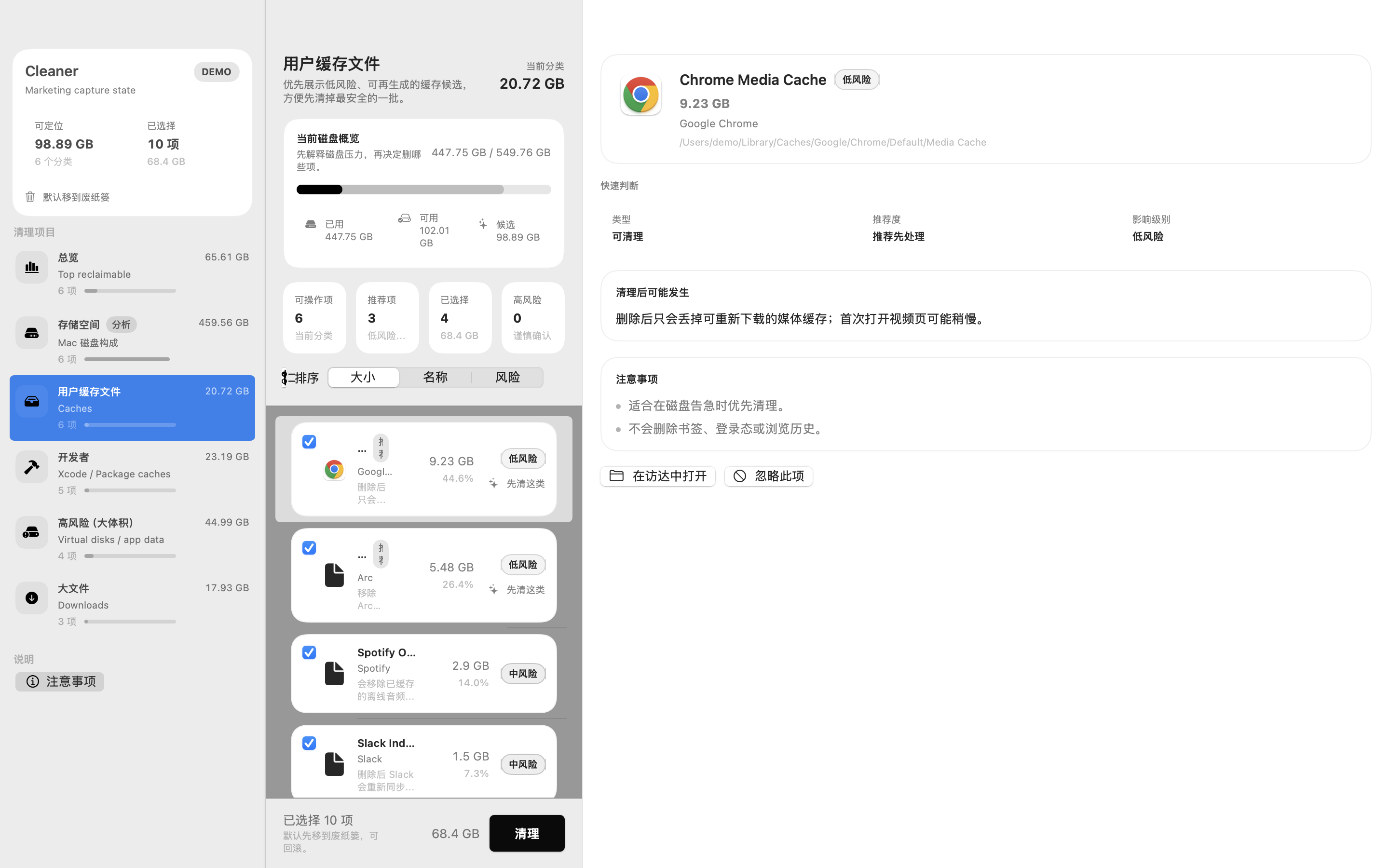
The interface explains where space went before asking the user to review candidates and risk.
02 / Framing
Trust comes from visible boundaries
- Separate recommended, optional, and high-risk candidates.
- Risk explanation must precede the cleanup action.
Separate recommended, optional, and risky
The product optimizes for an explainable safety boundary, not maximum deletion.
03 / Decision
Diagnose the machine before deleting
Storage pressure can coincide with hot processes, Spotlight, or headless browser residue, so the product includes a machine-health snapshot.
Disk pressure is read alongside CPU, indexing, and browser residue rather than as a one-off cleanup.
04 / Flow
Put deletion in the second half
Observe → Attribute → Review → Clean → Guard is both the safety order and the reading order.
Observe → attribute → review → clean → guard
Action follows attribution and review so deletion never becomes the default answer.
05 / Boundary
Local-first and scope-first
Cleaner focuses on user directories and avoids system paths by default. .noindex and temporary migration reduce recurrence without moving existing content automatically.
Primary scope
Avoid by default
Opt-in migration
Managed guard
User-owned action
Scanning stays user-directory first; existing content does not move by default and temporary migration is opt-in.
06 / Delivery
Evidence includes what cannot be claimed
The SwiftUI / SwiftPM architecture, local app, and test targets exist; the current XCTest limitation remains explicit.
The repository and local app artifact are verifiable; the current toolchain could not load XCTest, so no passing test claim is made.
Experience in depth
Pain points, user stories, and interaction design
Not a tech stack section. This is about the situation people are in, where they get stuck, and what I did about it.
My pain points
Every project here starts from somewhere I personally got stuck.
- P01
The disk fills up and the system only reports that "Other" takes 200 GB — which says nothing at all.
- P02
Similar cleaners treat "removable" as "should be removed", so after one click I do not know what I lost.
- P03
Without a visible risk boundary there is no trust, and without trust I will not run the tool at all.
- P04
Two weeks after cleaning it is full again, which means a single scan never addressed the cause.
- P05
Heat, high CPU, and a full disk often share one root cause — leftover headless browsers, Spotlight indexing — yet no tool shows them together.
User stories
Written as "as … I want … so that …", each mapped to a verifiable product action.
- US01
As someone whose disk just filled up, I want to see what the space is actually made of, so I know where to start.
- US02
As someone afraid of deleting the wrong thing, I want a risk level on every candidate, so the decision stays mine.
- US03
As someone who distrusts one-click tools, I want to select and confirm item by item, so cleaning is my choice rather than the tool's.
- US04
As someone whose machine keeps overheating, I want CPU hotspots and leftover browsers in the same view, so I can find the recurring cause.
- US05
As a long-term user, I want temp directories guarded by .noindex, so the same problem stops coming back.
Experience journey
In real usage order: what they are doing, where it hurts, how the product responds.
StageWhat they are doingFrictionProduct response
01Observe
The machine is slow or full and the first question is simply what is going on.
Symptoms — heat, disk pressure, stalls — are scattered across separate tools with no visible link.
A machine health snapshot watches CPU busy, hot processes, Spotlight, leftover headless browsers, and free space together.
02Attribute
Trying to find out who actually owns those 200 GB.
Most tools skip the explanation and jump straight to "recommended cleanup".
Scanning shows storage attribution first, putting explanation ahead of action.
03Review
Facing a long list of candidates and deciding what may be touched.
A uniform list forces an all-or-nothing choice.
Candidates are split into actionable, high-risk, and recommended, with user directories prioritised.
04Clean
Confirming the selection and running it.
One-click-wipe design is the main source of accidental deletion.
Item-level selection and confirmation with no select-all default, followed by a report of what changed.
05Guard
Wanting the problem not to return after this round.
Temporary files keep accumulating, so a single cleanup only postpones the issue.
Managed .noindex directories and opt-in relocation of temporary items — nothing existing is moved by default.
Interaction details
The micro-decisions that make it feel fluid or clumsy.
- Explanation before the button
- Risk notes sit above the clean action in the layout, because position is itself a statement of intent.
- No one-click primary action
- The main path is fixed as Scan → Review → Select → Clean: diagnose first, act second.
- Scanning stays in user space
- Scan logic focuses on user directories and explicitly avoids high-risk system paths.
- No implicit relocation
- Managed .noindex directories require an explicit opt-in; the tool never moves existing content on its own.
- A report after every run
- Each run states how much was freed and which paths were touched, so the action can be reviewed later.
Design details
Tradeoffs in the visual system, state language, and pacing.
- Cleaning designed as diagnosis
- The goal is not to delete more but to let someone read their machine and decide, which is what removes the fear.
- A visual language for risk tiers
- Actionable, high-risk, and recommended carry different visual weight so they are never misread as equivalent.
- A local desktop app
- High-sensitivity operations do not depend on the cloud; a SwiftUI desktop app matches the trust requirement.
- Five distinct states
- Scan, selection, report, machine health, and ongoing guarding each have their own presentation instead of one shared emphasis.